

How to Build a One-Page 3D Shop for a Configurable Product
A practical guide to building a fast shopping surface, interactive 3D configuration, checkout and order flow without requiring a traditional ecommerce platform.
Updated August 2026
Selling a configurable physical product online can become complicated surprisingly quickly.
A conventional ecommerce setup usually starts with a storefront. You create product pages, add images, define prices and stock, connect payments and shipping, and publish.
A configurable product adds another layer.
The buyer may need to choose materials, dimensions, components or accessories. Some options may depend on others. Price and stock may change as the configuration changes. And if the product itself is difficult to understand from photographs, you may also need interactive 3D or a guided product demonstration.
That often leads to a stack that looks something like:
website · ecommerce platform · configurator · 3D viewer · configurator-to-store integration · payment provider · shipping provider · tax logic · order system
There is another way to structure it.
If the product experience itself can handle configuration and is connected directly to the commerce lifecycle behind it, the shop can become much simpler.
A lightweight website can provide the surrounding company and marketing content, while the product-selling surface itself handles:
presentation → configuration → price → stock → basket → checkout → payment → order
Presenter3D is designed to support that architecture.
Start with the product, not the ecommerce platform
Before choosing software, define what the customer actually needs to do.
For a configurable physical product, that could be:
- understand what the product does;
- explore its important features;
- choose a valid configuration;
- see the current price;
- know whether it is available;
- add it to a basket;
- enter delivery details;
- pay;
- receive an order confirmation and invoice.
Notice what is not on that list: “Install a traditional ecommerce platform.”
That may still be the right choice for many businesses, particularly large catalog-based stores.
But it is not inherently required to complete a product sale.
For a startup or small business selling a few ordinary and 3D products, it can make sense to build the buying journey around the products first and add only the surrounding infrastructure that is actually useful.
Related: How to sell a configurable product online covers the same decision from the platform side.
Decide what your one-page shop actually needs
A 3D viewer on its own is not an ecommerce store.
It can show a product beautifully, but a selling surface also needs business state behind the visual experience.
At minimum, a serious one-page shop needs to understand:
| Layer | Responsibility |
|---|---|
| Product | What is being sold |
| Configuration | Which options and combinations are valid |
| Price | What the current configuration costs |
| Stock | Whether it can be sold |
| Business context | Which market, currency and seller apply |
| Basket | What the buyer intends to purchase |
| Checkout | Buyer and delivery information |
| Tax | Applicable tax rules |
| Payment routing | Which connected payment provider handles the transaction |
| Shipping | How the product is dispatched |
| Order | The durable business record |
| Invoice | The financial document for the sale |
| Communication | Order and customer notifications |
| After-sales | Returns, refunds and order changes |
Once those functions exist behind the product experience, a separate general-purpose ecommerce backend is no longer technically necessary just to complete the transaction.
Build a lightweight website around the shop
A business still needs a website.
Customers may need:
- a homepage;
- company information;
- contact details;
- privacy and terms pages;
- support information;
- marketing and SEO content.
But that website does not necessarily have to own the commerce system.
The frontend could be built with almost anything appropriate to the project:
Astro · Webflow · WordPress · Framer · Next.js · static HTML · a custom frontend
Its job is simply to provide the surrounding website experience.
The actual product-selling surface can then be embedded into that site or opened as its own page.
This works particularly well for a product-focused business where visitors arrive to understand and buy a specific product rather than browse thousands of unrelated catalog items.
Build the configurable product experience
The next step is to describe the product itself.
Depending on the product, that may be as simple as:
image → options → checkout
or considerably richer:
image → cinematic 3D → guided explanation → interactive configuration → checkout
Presenter3D experiences are studio-authored, so the project can include the pieces that actually help the buyer rather than forcing every product into the same viewer template.
A configurable experience can support:
Rule-based configuration
Options can depend on one another. For example, selecting component A disables component C, or material X is only available with frame Y.
The system works with configuration logic rather than requiring every possible combination to be represented as a separate product record.
Parametric configuration
Some product properties can change continuously.
Dimensions, positions or other numerical properties do not necessarily have to be represented as predefined variant values.
Flexible user interface
Controls can live:
- inside the Presenter3D experience;
- entirely in the surrounding web page;
- or in both places at once.
When both are used, the product state can remain synchronized in both directions.
Make the shopping surface available before 3D
This is one of the most important parts of the architecture.
A modern ecommerce page should not stop being useful simply because a detailed 3D scene is still loading.
A conventional shopping surface can usually expose essential information almost immediately:
product image · available options · price · stock · delivery information · checkout
Waiting several seconds for 3D before allowing the buyer to shop would be a step backward.
Presenter3D Hybrid mode avoids that.
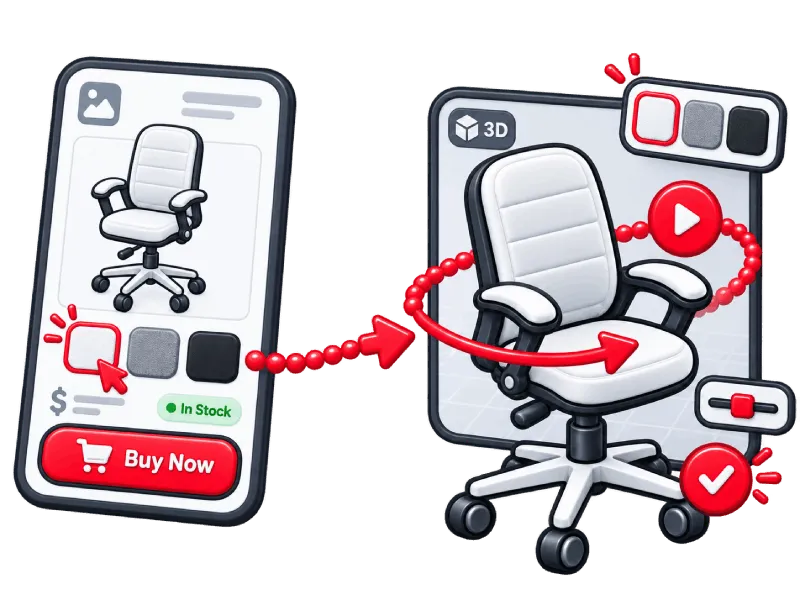
The first useful state is lightweight
The product can initially appear as a normal flat shopping surface.
The customer can already:
- view the product;
- choose options;
- see pricing;
- see stock or availability;
- select market or language where applicable;
- add products to the basket;
- begin checkout.
Meanwhile, the full 3D experience loads separately in the background.
When 3D becomes ready, the current state is preserved
If the visitor changes the product before the viewer finishes loading, that configuration is not lost.
When 3D becomes available, the same selected product state is already applied.
The richer 3D experience becomes an upgrade to an already working shop, not a loading screen blocking the sale.
For a one-page shop built around Presenter3D Commerce engine, this should normally be the standard ecommerce flow. The same Hybrid architecture can also run against an external commerce backend.
Let 3D load when the page is ready for it
Hybrid mode solves the shopping-surface problem.
The viewer itself is also designed so the surrounding page can control when the heavier 3D runtime begins loading.
That matters because a modern product page may already contain:
animations · galleries · analytics · consent tools · recommendation widgets · marketing scripts · other interactive elements
There is little value in forcing every expensive page feature to initialize at exactly the same time.
Presenter3D can therefore be deferred or lazy-loaded according to the needs of the embedding page.
Once loading begins, the viewer uses a performance-oriented strategy.
It can start with extremely low-resolution textures and replace them progressively with higher-resolution versions as they become available.
Texture resolution can adapt to the device.
Textures belonging to invisible objects can be released from GPU memory and recreated when those objects become visible again.
Lighting can rely heavily on prebaked lightmaps rather than expensive fully dynamic lighting, while techniques such as DualRGBM can still create dynamic-looking lighting changes.
For a deeper look at geometry, textures, GPU memory and runtime strategy, see 3D Product Configurator Performance.
The goal is not merely to load 3D as early as possible, but to make the product useful as early as possible and introduce visual richness efficiently afterward.
Add the commerce layer behind the product
Once the product experience exists, Presenter3D Commerce engine can provide the transactional layer behind it.
The same commerce setup can manage:
- product pricing;
- stock;
- regional rules;
- business contexts;
- currencies;
- warehouses;
- basket;
- checkout;
- tax logic;
- payment routing;
- shipping routing;
- orders;
- invoices;
- customer emails;
- returns and refunds.
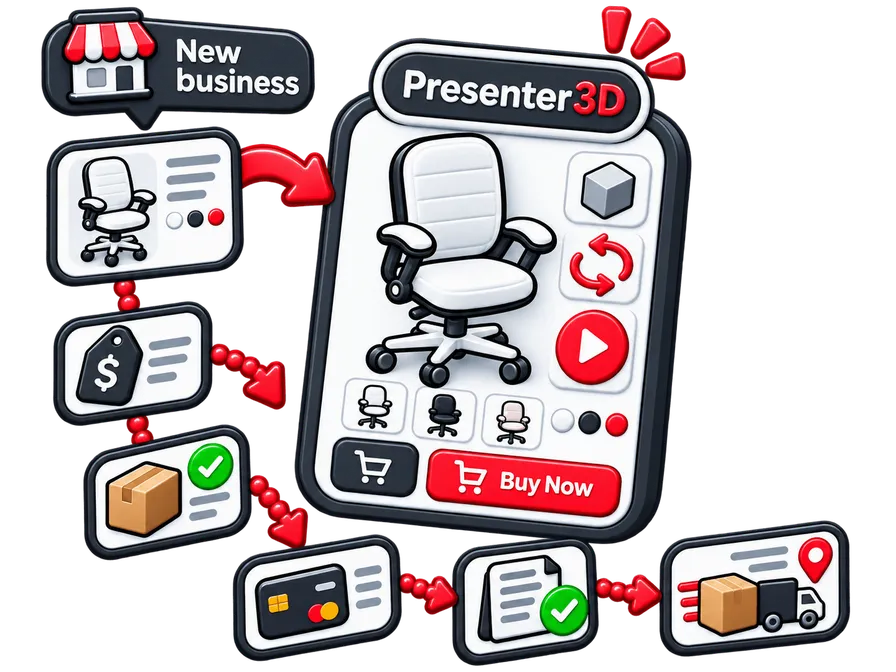
The commerce layer is not tied to 3D.
A standard image-based product can participate in exactly the same commerce flow.
That becomes important later when the shop contains a mixture of ordinary and interactive products.
Connect a payment gateway
Commerce engine manages the commercial transaction, but it does not need to become a payment network itself.
A connected payment provider handles the actual movement of money.
Presenter3D supplies the surrounding logic:
what is being purchased · which seller owns the transaction · the price · tax · checkout state · the resulting order · invoice and communication
The payment provider performs the financial transaction.
This keeps the architecture clean.
The business can use specialist infrastructure where specialist infrastructure makes sense without adding another general-purpose ecommerce platform merely to coordinate the sale.
Add shipping and tax services only where you need them
The same principle applies to shipping and tax.
Some businesses can operate with their own configured regional and tax rules.
Others may eventually require specialist services because they ship across complicated jurisdictions or use many carriers.
Those services can be connected when necessary.
The distinction is important: a shipping provider or tax service performs a specialist function around commerce, while a second ecommerce platform would duplicate the commerce lifecycle itself.
The goal of the one-page architecture is not to eliminate every external provider.
It is to avoid unnecessarily stacking multiple systems that all try to own the same product, basket and order.
Keep the basket simple for the buyer, flexible underneath
A buyer may add several products to the same basket.
That does not mean every product has to share exactly the same operational context.
Different products may belong to:
- different sellers;
- different payment accounts;
- different shipping providers;
- different warehouses;
- different tax contexts.
Presenter3D can keep those products grouped in the buyer-facing basket while finalizing them independently underneath.
That makes it possible for one product transaction to succeed even if another one cannot be completed.
It also avoids forcing unrelated seller, shipping or tax contexts into a single artificial order merely because the buyer selected the products during the same shopping session.
A one-page 3D shop
Presenter3D's office-chair demo shows how this architecture can work on a single page.
The page starts as a lightweight shopping surface instead of waiting for the full 3D scene.
Visitors can:
- choose the chair configuration;
- see current pricing;
- check stock and delivery information;
- select market and language;
- access checkout.
The 3D experience loads in the background.
When the viewer becomes ready, the selected configuration is already synchronized into the interactive product experience.
The same page demonstrates product presentation, configuration and a complete shopping flow without requiring Shopify or WooCommerce as the commerce authority.
The checkout runs in demo mode, so no real payment is taken and no chair is shipped.
Validate your commerce setup before launch
For the merchant or project team, not the public visitor.
Once the product experience and commerce rules are configured, test the complete buying lifecycle against the requirements defined for your project.
Some checks, such as tax, warehouse routing, payment or shipping logic, require access to the merchant dashboard, order data or configured business rules rather than only the public storefront.
Initial experience
- Does the shopping surface appear quickly?
- Can the buyer configure the product before 3D is ready?
- Does the page remain responsive while the viewer loads?
- Does the selected state transfer correctly into 3D?
Product logic
- Are valid configurations accepted?
- Are incompatible choices prevented?
- Does pricing update according to the configured rules?
- Does stock reflect the correct source and market?
- Do unavailable products behave correctly?
Market and business rules
- Does currency change correctly?
- Are the configured tax rules applied correctly?
- Is the expected warehouse or fulfillment route selected?
- Are localized labels and languages correct?
- Does each product use the intended seller, payment and shipping context?
Basket and checkout
- Can multiple products be added?
- Does the correct checkout state appear?
- Does each product use the right seller/payment/shipping context?
- What happens if one product cannot complete while others can?
After checkout
- Are the expected order records created?
- Are invoices created with the correct seller and commercial data?
- Are customer communications correct?
- Does the buyer portal expose the intended order information?
- Can cancellations, refunds and returns follow the configured workflow?
Devices
- Test mobile.
- Test desktop.
- Test slower networks.
- Test weaker devices.
The purpose of Hybrid mode is not merely to make a performance score look better.
It should make the shop genuinely usable while the richer experience is still arriving.
Add complexity only when the business actually needs it
A one-page shop can start very small.
Over time, the business may add:
more products · more markets · currencies · languages · warehouses · dealers · separate selling entities
Presenter3D can expand around those requirements.
Pricing, stock, tax and dispatch rules can differ by market or business context.
Different dealers or operating entities can use their own pricing, stock, customer-facing identity and payment/shipping setup while still participating in the same overall product infrastructure.
More specialized systems can also be integrated later if the business genuinely reaches the point where they are useful:
accounting · ERP · WMS · CRM · specialist tax systems · additional commerce integrations
You do not need to build the infrastructure of a multinational company before the first product has found its customers.
The shop can contain ordinary products too
A Presenter3D-powered shop does not have to consist entirely of 3D experiences.
Standard image-based products can live alongside 3D or configurable products in the same commerce setup.
They can use the same:
product data · pricing · stock · market rules · basket · checkout · orders · invoices · selling entities
So a business with a few ordinary and 3D products does not need one commerce system for the conventional products and another for the interactive ones.
The presentation can change from product to product.
The commerce foundation does not have to.
Choosing between platforms first? See Best 3D product configurators for ecommerce.
Final takeaway
A one-page 3D shop is not created by putting a checkout button inside a viewer.
It works because the product experience and commerce lifecycle are connected from the beginning.
The architecture can remain surprisingly small:
lightweight website → Presenter3D shopping surface → Commerce engine → payment, shipping and other specialist providers where required
Hybrid mode keeps the store useful before 3D is ready.
The 3D layer provides the richer product explanation and configuration when it becomes available.
Commerce engine handles the same transaction lifecycle behind both standard flat and 3D/configurable products.
For a startup or small business selling a few ordinary and configurable physical products, that can remove a lot of infrastructure that would otherwise exist only to connect one system to another.
The result is not a 3D viewer embedded into an ecommerce store.
It is a product experience that can become the shop itself.
See a one-page 3D shop in action
Configure an office chair, switch markets and languages, see pricing and availability, and open checkout directly from the same shopping surface.