

How to Sell a Configurable Product Online: An Ecommerce Guide for Startups
A practical guide for startups and small businesses selling physical products that need more than a standard product page.
Updated August 2026
Most guides to starting an ecommerce business assume the product itself is simple.
Choose a platform. Add your products. Set up payments and shipping. Design the store. Launch.
That is a sensible model for ordinary ecommerce. Stripe's current small-business guide, for example, evaluates ecommerce platforms around storefront design, product management, inventory, checkout, payment integrations, shipping, marketing and analytics.
But that model changes when the thing you are selling is not simply photo → size → color → price → Add to Cart.
A configurable physical product may have adjustable dimensions, compatible and incompatible options, moving parts, different materials, regional pricing, live stock, custom delivery rules, or hundreds or thousands of possible valid configurations.
And before buyers can purchase it, they may first need to understand how the product actually works.
For a startup selling that kind of product, the ecommerce problem becomes larger than choosing Shopify or WooCommerce.
You need to answer a chain of questions:
How will people understand the product? How will they configure it? How will the configuration affect price and availability? How quickly can they start shopping? Who owns checkout, payment, shipping and tax? What happens after the order? And how much infrastructure do you really need on day one?
This guide walks through those decisions and the three main ways a startup can build the stack.
Why configurable products create a different ecommerce problem
Traditional ecommerce platforms are very good at selling products that can be represented as a manageable collection of variants.
Shopify currently supports up to 2,048 variants per product and three product options. Beyond that, Shopify recommends using third-party apps or custom theme logic.
WooCommerce uses a similar variation model in which combinations of attributes can carry their own price, stock, image, shipping data and other properties.
That is perfectly adequate for many products. A T-shirt with 5 sizes × 8 colors does not need an advanced configuration system.
But consider an ergonomic office chair with finish, upholstery, armrest type, base type, headrest, lumbar support, seat depth, seat height and recline behavior.
Or furniture whose dimensions can change continuously rather than from a predefined list.
Or industrial equipment where selecting one component makes three others unavailable.
At that point the product stops behaving like a simple list of SKUs. The ecommerce system needs to understand product logic.
WooCommerce's own variable-product documentation illustrates the performance side of this problem: when a variable product has more than 30 variations, its dynamic option dropdowns become static by default because calculating available combinations after every selection can slow the product page down.
The problem is therefore not only how many combinations exist. It is how efficiently the product logic can be represented and presented to the buyer.
What a configurable-product startup actually needs
Before choosing software, separate the problem into layers.
| Requirement | What has to happen |
|---|---|
| Product presentation | Buyers need to understand the product and its mechanisms |
| Configuration | Valid options, rules and dimensions must be enforced |
| Pricing | The current configuration needs an accurate price |
| Stock & availability | Availability may depend on variant, location or market |
| Shopping surface | Buyers should be able to start shopping without unnecessary waiting |
| Basket / cart | Selected products need to stay grouped for purchase even when their transaction or fulfillment requirements differ |
| Checkout | Customer/address/payment information must be collected |
| Payment flow | A connected payment gateway processes the financial transaction |
| Shipping | Delivery cost and dispatch logic need to be resolved |
| Tax | Appropriate tax rules need to be applied |
| Orders & invoices | Successful transactions need durable business records |
| Returns/refunds | The lifecycle continues after payment |
| Regions & languages | International businesses need contextual prices, rules and content |
| Growth | Warehouses, dealers or additional selling entities may appear later |

A normal ecommerce platform covers many of these. A configurator covers another subset. A payment provider covers another. A shipping provider another.
And that is how a founder who started with “I want to sell this chair online” can eventually find themselves integrating several different services before the first serious customer has placed an order.
The goal should not be to avoid every external service. Payment gateways, carriers, tax services and accounting systems all solve specialized problems.
The useful question is: how many overlapping commerce systems do you really need?
Three ways to launch a configurable product online
There are three realistic architectures.
1. Traditional ecommerce platform + configurator
This is the most common approach. You begin with Shopify, WooCommerce or BigCommerce, then add a product configurator and whatever integration is required between the two.
The ecommerce platform remains responsible for catalog, customer accounts, basket, checkout, orders, payment integration, promotions, shipping and storefront content, while the configurator handles the complex product state.
When this makes sense
This is usually the best path when the company:
- already has an ecommerce store;
- sells many conventional products alongside configurable ones;
- needs categories, search and merchandising;
- already has staff familiar with the ecommerce platform;
- uses an established app ecosystem;
- does not want to move its existing business logic elsewhere.
For an established Shopify or WooCommerce merchant, replacing the store simply because you want better product configuration would often make little sense.
The tradeoff
Now two systems need to agree about the same product.
- If the buyer changes the product in the configurator, does the store know the correct price?
- If a variant sells out, does the configurator know?
- If an option changes shipping requirements, which system decides?
- If the buyer changes a control outside the 3D viewer, does the 3D state follow?
None of these problems is unsolvable. But they become integration work.
2. Build a custom ecommerce stack
The second approach is to build exactly what the product needs. A development team can combine a custom frontend, custom configurator, payment API, inventory database, shipping API, tax logic, order backend and transactional email.
This gives maximum control. It also gives the startup maximum responsibility.
Every feature now has to be designed, implemented, tested, secured and maintained. A custom stack does not make ecommerce concerns disappear. It simply means your team owns them.
When this makes sense
Custom development can be the right answer when ecommerce behavior is genuinely unusual, the company already has a strong engineering team, the product needs workflows existing platforms cannot represent, or the resulting software is itself strategically valuable.
For an early-stage product company, however, building the entire ecommerce foundation can consume a lot of time that has nothing to do with validating whether customers actually want the product.
3. Use an integrated product-experience and commerce layer
The third approach is to start from the product experience itself.
Instead of beginning with a general ecommerce store and adding an interactive product layer afterward, Presenter3D can combine product presentation, guided or interactive 3D, configuration, pricing and stock, regional business logic, basket and checkout, payment and shipping routing, orders and invoices, and returns inside one product-oriented system.
The business can then use as much or as little of that stack as it needs.
For a startup beginning without an ecommerce platform, this can remove several integration steps. For an established company, Presenter3D can instead leave commerce in the existing system.
Starting from zero: the Presenter3D path
Imagine a startup has developed a new configurable office chair. They have the physical product, product specifications, reference images or CAD/3D files, a website and a payment-gateway account. But no ecommerce infrastructure.
A conventional approach might require them to choose an ecommerce platform, a configurator, a 3D production solution, viewer hosting, configurator-to-store integration, inventory setup, checkout and transactional emails.
Presenter3D can collapse much of that process.
The studio creates the product experience, including modeling or web optimization where required, interaction, animation and configuration logic. Presenter3D hosts the experience. The optional Commerce engine can then supply the transactional layer.
A startup can connect a payment gateway and use Presenter3D for pricing, stock, market rules, basket and checkout, tax logic, payment and shipping routing, orders, invoices, customer emails and returns.
Shipping or specialist tax providers can still be connected when the business requires them. The important distinction is that those services are specialist providers around the commerce lifecycle, rather than another ecommerce platform that Presenter3D depends on in order to complete the sale.
Presenter3D Commerce engine is also not limited to 3D products. It can sit behind a conventional flat shopping interface when that is the right presentation.
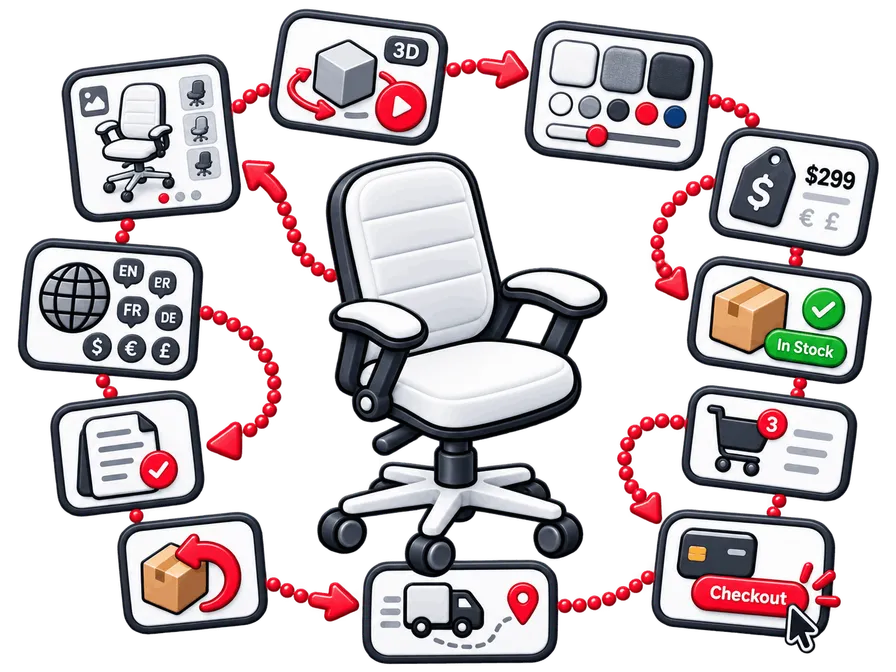
You do not need Presenter3D Commerce engine to use Presenter3D
If the business already has Shopify, WooCommerce or another backend, Presenter3D does not need to replace it.
The existing store can remain the source of truth for price, stock, availability and checkout through Presenter3D's Sync API and project integration.
The merchant keeps the ecommerce infrastructure it already trusts. Presenter3D becomes the product-experience and configuration layer on top.
This creates two very different paths using the same platform.
New business
- Presenter3D + Commerce engine.
- Use Presenter3D as both the interactive product layer and the transactional commerce backend.
Existing ecommerce business
- Presenter3D + existing commerce.
- Keep the current store and integrate Presenter3D with it.
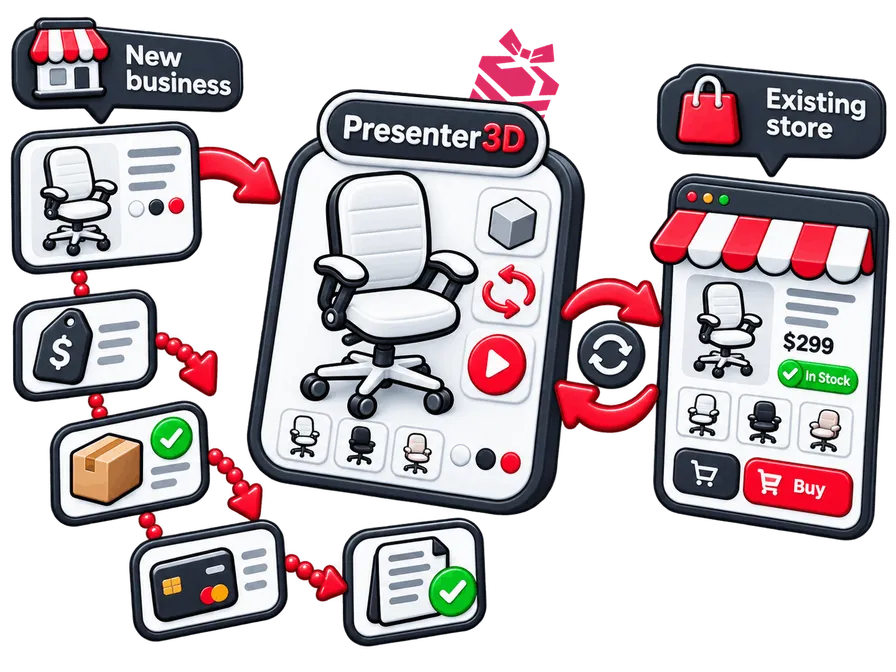
There is also a mixed model where Presenter3D owns only selected parts of the commerce flow.
Do not make shoppers wait for 3D before they can shop
A configurable product often benefits enormously from 3D. That does not mean the ecommerce page should become a loading screen.
Traditional product pages can expose the product image, options, price, availability and checkout controls almost immediately. Replacing that with several seconds of Loading 3D… is not automatically progress.
Presenter3D therefore separates the shopping surface from the 3D loading lifecycle.
A page can begin with a lightweight image or product surface containing working controls, price, stock and checkout. The visitor can start shopping while the 3D experience loads in the background. When the viewer becomes available, the current configuration is carried into 3D.
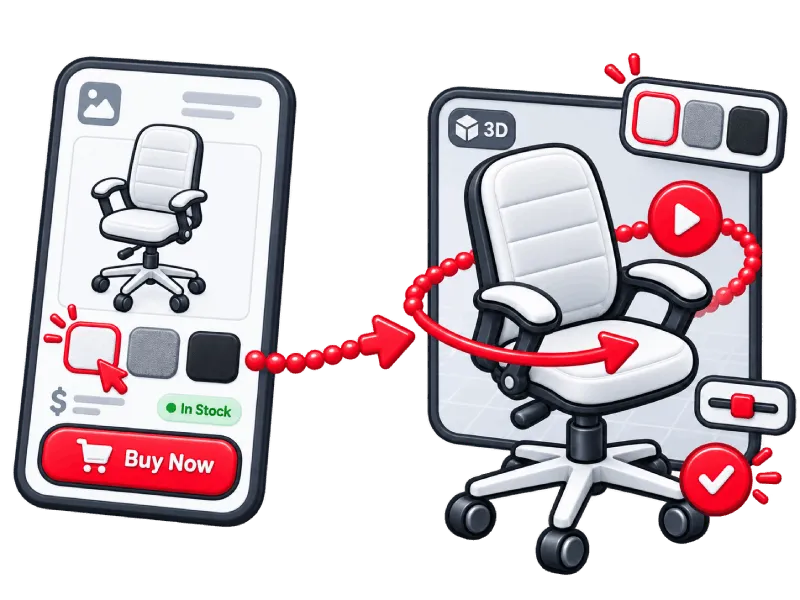
And this does not require Presenter3D Commerce engine. The flat shopping surface can be driven by Presenter3D Commerce engine, Shopify, WooCommerce, another commerce backend or custom business APIs, provided the systems are integrated correctly.
Shopify and WooCommerce can show 3D. That is not the same thing as Hybrid mode.
It is important not to overstate the difference.
Shopify natively supports 3D models as product media, alongside images and video. Shopify's own theme guidance actually recommends that 3D viewers remain inactive by default when the page first loads.
WooCommerce core is primarily image-based for product galleries, but 3D can be added through marketplace extensions. Some current WooCommerce 3D/media extensions also support lazy loading.
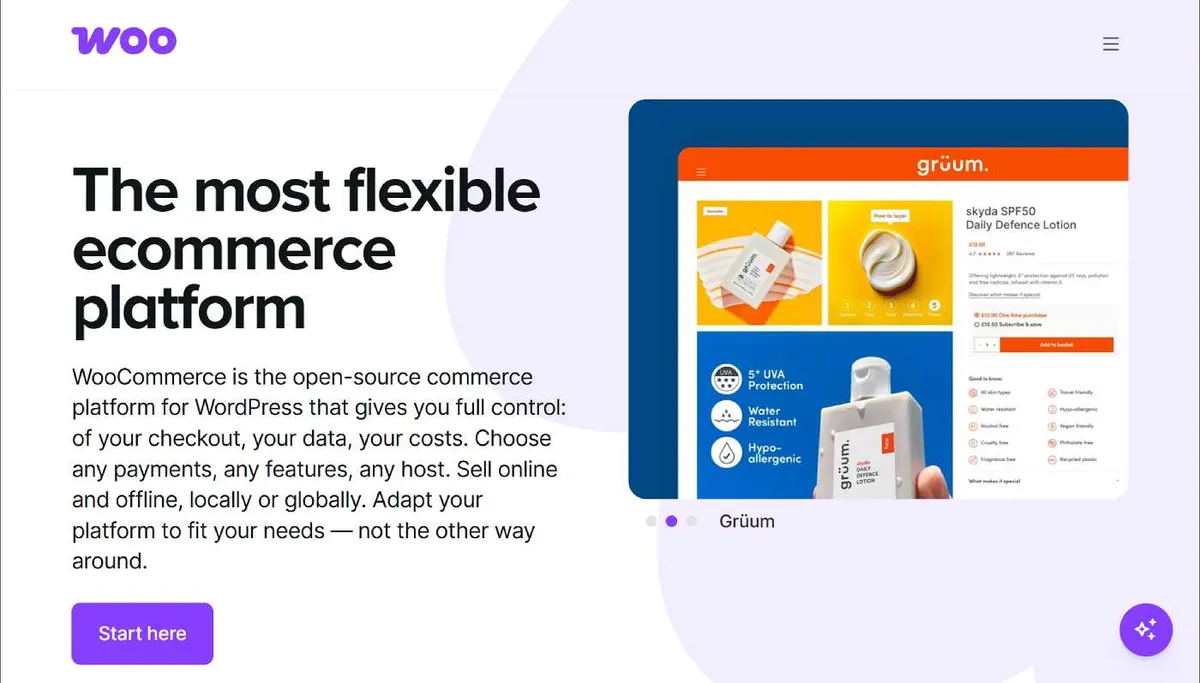
Shopify and WooCommerce are trademarks of their respective owners. Screenshots are reproduced here for identification and comparison.
So the fair claim is not that Shopify or WooCommerce force the buyer to wait for a 3D viewer before the store works. They do not have to.
The distinction is what the first surface is capable of doing and how it relates to the eventual 3D configurator.
Presenter3D Hybrid mode can make the first lightweight surface a state-synchronized configurable shopping surface. The buyer can change product options, while pricing, stock, availability and checkout remain functional. When the 3D layer becomes ready, the same current configuration is already applied.
That is different from simply showing a static image while a separate 3D media element waits to activate.
Shopify's native 3D support is documented as product media. Its conventional product-configuration model remains variant-based, and products beyond its native variant/option model require apps or custom logic. WooCommerce can also combine variable products with 3D extensions, but the exact synchronization and configuration behavior depends on the extension and implementation.
Presenter3D's advantage is therefore not merely lazy loading a model. It is keeping the product configurable and shoppable before full 3D is ready, then handing the same state into the richer experience.
The 3D viewer should also respect the rest of the website
A modern ecommerce page rarely contains only one application. It may already run hero animation, analytics, product galleries, recommendation systems, personalization, consent management and marketing scripts.
So loading a heavy 3D runtime immediately is not always the smartest choice. Presenter3D allows the embedding page to control when the viewer begins loading, so 3D can be loaded lazily or deferred until the page is ready for it.
Once loading begins, the viewer uses a performance-oriented rendering strategy. It can start with extremely low-resolution textures and progressively replace them with higher-resolution versions. Texture resolution is adapted to the device. Textures for invisible objects can be released from GPU memory and recreated when those objects return.
Lighting relies heavily on prebaked lightmaps rather than expensive fully dynamic lighting, while techniques such as DualRGBM can still create dynamic-looking lighting changes.
The goal is not simply to load the 3D scene as quickly as technically possible. It is to make the product page useful first, then add richer presentation without unnecessarily competing with the rest of the site.
Configuration should describe the product, not explode the catalog
A configurable product can create another problem: combinatorial growth.
Imagine five option groups containing 8 × 6 × 5 × 4 × 3 combinations. That is already 2,880 combinations. And that still assumes every option is discrete.
Shopify has significantly expanded its native variant capacity to 2,048 variants, which is enough for many stores, but it still limits products to three option categories and directs merchants toward apps or custom development when those limits are exceeded.
WooCommerce can support large variation sets, but its own documentation changes the behavior of dynamic variation dropdowns above 30 variations by default to avoid the performance cost of recalculating valid combinations after each choice.
Presenter3D can instead treat configuration as logic. It supports rule-based configuration, where the system validates combinations from product rules, and parametric configuration, where values such as dimensions can change continuously rather than being stored as thousands of individual catalog variants.
That is particularly useful when the physical product itself is configurable rather than merely available in a long list of predefined SKUs.
Related: Best 3D product configurators for ecommerce, Presenter3D vs Salsita.
What happens when the startup grows?
The architecture you choose on day one matters because a successful product rarely stays exactly where it started.
A startup may eventually add another country, another currency, another warehouse, another language, a distributor, regional dealers or a separate operating company.
Presenter3D Commerce engine is built around contextual commerce rather than assuming every buyer sees the same product data. Pricing, stock, tax and dispatch behavior can vary by market and business context.
Different selling entities or dealers can operate as self-contained commerce setups with their own pricing, stock, payment/shipping configuration and customer-facing identity.
The same product experience can therefore participate in multiple regional or organizational selling contexts without duplicating the product itself.
What Presenter3D does not replace
An all-in-one system should not be confused with literally every piece of software a company might ever need.
Presenter3D Commerce engine is designed to cover the product-selling lifecycle. It is not an accounting ledger, a warehouse barcode/picking system, a general ERP, a CRM, a full CMS or a manufacturing planning system.
Many startups do not need those systems at all on day one. Others already use them. When they become relevant, the sensible architecture is usually integration rather than rebuilding them inside the commerce platform.
A payment gateway is an obvious example: Presenter3D can own checkout and the order lifecycle without pretending to be the financial network that actually processes the card transaction. The same principle applies to specialist shipping, accounting, ERP or warehouse systems.
Where a traditional ecommerce platform is still the better choice
Presenter3D is not the best foundation for every online business. If your company sells hundreds or thousands of ordinary products, broad categories and collections, products primarily discovered through catalog browsing, conventional storefront search, frequent self-service catalog merchandising and campaign management, or runs a business built heavily around a large app ecosystem, then Shopify, WooCommerce, BigCommerce or another conventional ecommerce platform may be the better foundation.
Those platforms have spent years building general-purpose storefront ecosystems.
Presenter3D's business-rule model can support project-specific promotions such as volume discounts, customer-specific pricing, date-based offers or other conditional rules when they are required, but it does not currently provide the same broad self-service catalog, collection, search and merchandising environment as a mature general-purpose store platform.
Presenter3D becomes especially interesting when the product itself is the center of the buying experience: configurable furniture, ergonomic products, machinery, technical equipment, high-value products, made-to-order goods, and products with mechanisms that need explanation.
For a startup selling one or several products of that kind, starting with a large generic ecommerce stack can mean buying and integrating infrastructure before you know whether you actually need all of it.
A practical decision guide
Choose Shopify / WooCommerce + a configurator if
- you already have the ecommerce store;
- you sell many conventional products;
- catalog browsing and merchandising matter;
- you depend heavily on an existing app ecosystem;
- the configurator is one feature inside a broader store.
Choose a custom stack if
- your workflows are genuinely unique;
- you have engineering resources;
- owning the commerce technology itself creates strategic value;
- existing platforms cannot model the required business logic.
Consider Presenter3D as the primary stack if
- you are launching a complex or configurable physical product;
- you need buyers to understand the product before purchasing;
- interactive 3D or guided explanation is important;
- configuration affects price, stock or availability;
- you want to avoid assembling several product-experience and commerce systems;
- you want the option to launch without Shopify or WooCommerce;
- you still want the ability to integrate those systems later.
The startup advantage: build only what you actually need
There is a common temptation when starting an ecommerce business: build the infrastructure of the company you hope to become.
But the business may not need all of that yet. A startup selling one configurable product probably does not need enterprise PIM governance, warehouse-management software, a massive CMS, an ERP implementation or dozens of plugins.
It needs to explain the product, configure it correctly, show the right price, take payment, create the order and deliver it. Then it can add complexity when real business demand appears.
That is the philosophy behind Presenter3D's modular architecture. Start with the product experience. Add Commerce engine if Presenter3D should own the transaction. Keep external commerce if you already have it. Add specialized integrations when the business reaches the point where they provide real value.
Frequently asked questions
Do I need Shopify or WooCommerce to sell a configurable product online?
No.
A configurable product can be sold through a traditional ecommerce platform, a custom commerce backend, or a system such as Presenter3D with its optional Commerce engine.
If you already use Shopify or WooCommerce, keeping it and integrating the configurator may be the most sensible option.
If you are starting without an ecommerce stack, Presenter3D Commerce engine can provide the transactional layer without requiring another ecommerce platform.
Does Shopify support 3D products?
Yes.
Shopify supports 3D models as native product media alongside images and video.
That is different from a full complex-product configuration engine. Shopify's native product model supports up to 2,048 variants and three product options; more complex configuration normally requires an app or custom implementation.
Does WooCommerce support 3D products?
WooCommerce core product galleries are primarily image-based, but 3D viewing can be added through extensions and integrations. Current WooCommerce marketplace extensions support GLB/3D product media, and some support lazy loading.
The exact relationship between the 3D viewer, product variations and checkout depends on the chosen extension and implementation.
What is the difference between product variants and product configuration?
Variants represent predefined versions of a product, for example red or blue, small or medium or large.
Configuration describes rules governing how a product can change. That may include compatible components, conditional options, continuously adjustable dimensions, pricing dependencies and availability rules.
Simple configurable products can often be represented entirely through variants. More complex products benefit from a dedicated configuration model.
Can a configurable product have thousands of combinations?
Yes.
The important question is whether those combinations need to exist as thousands of independent catalog records.
Rule-based configuration can represent valid combinations through product logic instead. Parametric configuration can go further by supporting continuously adjustable values that cannot realistically be represented as predefined variants.
Does an interactive 3D product page have to load before checkout works?
No.
With the right architecture, the conventional product-shopping interface can become usable first while the richer 3D experience loads separately.
Presenter3D Hybrid mode is designed around this principle: a configurable shopping surface can remain active before full 3D is ready, and the current product state can carry into the viewer when it loads.
Does Presenter3D Commerce engine require 3D?
No.
Commerce engine can also support conventional flat product interfaces. 3D is one possible presentation layer, not a requirement for the commerce backend.
Can I start with Presenter3D Commerce engine and move to another ecommerce system later?
Yes.
Presenter3D separates the product-experience layer from the commerce source.
A business can begin with Commerce engine and later integrate an external store, or begin with an existing commerce platform and use Presenter3D only for the product experience. The architecture can also mix external and Presenter3D-owned commerce functionality.
What external services might a startup still need?
At minimum, a business taking online payments needs an appropriate payment provider.
Depending on where and what you sell, you may also use shipping/carrier services, specialized tax providers, accounting software or other operational systems.
Those services handle specialized functions around commerce rather than replacing the product experience and transactional commerce layer itself.
Final takeaway
Selling a configurable physical product online is not just an ecommerce-platform decision. It is a product-experience problem, a configuration problem and a commerce problem at the same time.
A traditional ecommerce platform plus a configurator can solve it well, especially when the store already exists. A custom stack can solve almost anything, if the business is prepared to build and maintain it.
Presenter3D offers a third path: build the product experience and the commerce foundation together, then integrate additional systems only when the business actually needs them.
For a startup launching a complex or configurable physical product from scratch, that can mean fewer systems to choose, fewer overlapping integrations to maintain, and a shorter path from “Here is our product” to “A customer has configured it, paid for it, and placed an order.”
Sources
Stripe / small-business ecommerce context
Shopify
Launch the product first. Add the infrastructure when you need it.
Presenter3D can build, host and integrate the interactive product experience, then either connect it to your existing commerce stack or provide the commerce backend itself.