

How to Add a 3D Product Configurator Without Slowing Down Your Store
A practical guide to instant shopping, progressive 3D loading and real-time optimization across real devices.
Updated September 2026
What a fast 3D ecommerce page should feel like
Imagine opening a product page built around a complex configurable 3D product with high-quality materials, cinematic animation and live commerce data.
The page feels as immediate as a conventional image-based store.
The product is already visible. Options, price, stock and checkout are usable within the first moments. The visitor can begin shopping without waiting for the full 3D scene.
When configured for machine readability, the page can also expose a poster image, descriptive alt text and structured Product / 3DModel data so search engines and AI systems can understand what the product experience represents without having to render the 3D viewer.
Meanwhile, the richer 3D experience loads in the background.
When it becomes ready, the configuration the shopper has already selected is applied automatically. Texture quality improves progressively, and the interactive experience becomes available without restarting the buying journey.
That is the target.
Achieving it requires two strategies at the same time: make the 3D experience itself as efficient as possible, and make sure the ecommerce page never has to wait for it.
Accept the fundamental constraint: 3D costs more than a static image
This is the most important performance constraint to accept, because it changes the entire architecture.
A static product image is fundamentally cheap for a browser to display.
An interactive 3D product experience may require:
JavaScript · geometry · textures · materials · shaders · animation · interaction logic · configuration rules · GPU resources
Even after careful optimization, the browser still has more work to do than it would when displaying a normal image.
So the goal should not be to make 3D magically cost the same as an image. The better goal is to make the shopping experience feel as immediate as an image-based store while the richer 3D layer becomes available progressively.
That is the architectural premise behind everything that follows.
Treat the whole product page as the performance budget
A configurator does not run in isolation. A real ecommerce page may already contain:
navigation · product imagery · analytics · consent tools · recommendations · reviews · marketing scripts · pricing and stock requests · basket state · animation
Adding a 3D viewer means adding another participant to an already busy page.
Shopify's performance guidance makes the same broader point: apps, third-party libraries, analytics, images, video and other features all influence storefront performance, and merchants should decide what genuinely needs to load first and what can arrive later.
That means reducing a model from 20 MB to 8 MB does not automatically make the product page fast. The page may still:
- delay important content;
- block the main thread;
- respond slowly to controls;
- upload large textures to the GPU;
- shift layout when the viewer appears;
- compete with more important requests.
A meaningful performance budget includes the page, the shopping surface, the business logic and the 3D runtime.
Measure the shopping experience before measuring the viewer
Core Web Vitals remain useful baseline measurements. Google's current recommended “good” thresholds are LCP within 2.5 seconds, INP within 200 ms and CLS of 0.1 or less, evaluated at the 75th percentile of real page loads.
They answer three useful questions: how quickly the important page content appears, how responsive the page remains when the visitor interacts, and whether the layout stays stable while everything loads. Google's Core Web Vitals documentation defines all three.
But ecommerce with a 3D configurator needs one more practical measurement.
Time to first shoppable surface
Ask: when can the visitor first perform a meaningful shopping action? For example, choose a finish, change an option, see a price, check availability, add the product to a basket or begin checkout.
That moment does not have to wait for full 3D readiness. And normally, it should not.
This is not a Google Core Web Vital. It is a practical ecommerce metric, and it is the one this guide keeps returning to.
Make the shopping surface useful before 3D
A traditional product page can expose useful information almost immediately:
product image · options · price · stock · delivery · basket · checkout
The wrong architecture is to load 3D, initialize the viewer, parse geometry, upload textures, initialize configuration and only then enable shopping. That makes the most expensive part of the page a gate in front of basic ecommerce.
Presenter3D Hybrid mode takes the opposite approach. The initial product surface can be lightweight and immediately usable.
The visitor can already see the product, choose options, see pricing, check availability, use the basket and start checkout.
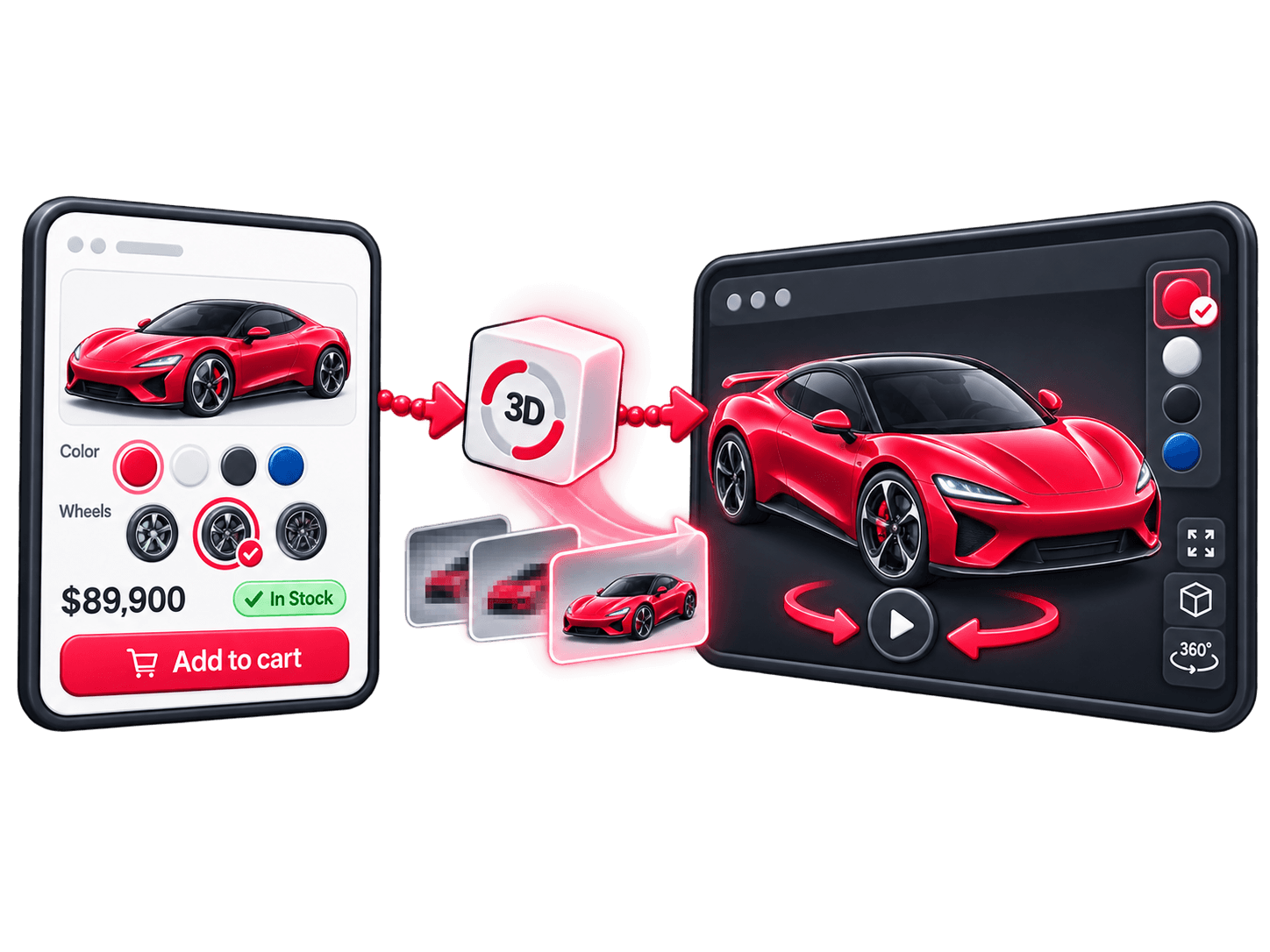
The full 3D experience loads separately. When it becomes ready, it inherits the product state the customer has already selected.
The richer experience becomes an upgrade to a working shop rather than a loading screen blocking it.
Hybrid mode is not a workaround for a slow viewer. It is the recommended ecommerce architecture whenever a rich 3D experience would otherwise delay the first shopping interaction. It also does not require Presenter3D Commerce engine; the flat surface can be driven by an external commerce or business source.
This guide extends the architecture described in How to build a one-page 3D shop from the performance side.
Make the first product surface machine-readable too
The first lightweight surface can do more than improve perceived speed. It can also provide meaningful product information outside the JavaScript viewer.
For projects where this layer is enabled, Presenter3D can expose a static poster image, descriptive alt text, Product structured data for real products, and linked 3DModel structured data for the embedded experience.
This gives non-JavaScript crawlers useful information about the product and the embedded 3D experience before the runtime starts.
The same architecture can therefore improve three things at once: human first-use speed, commerce usability and machine readability.
The 3D viewer becomes an enhancement rather than the only place where product meaning exists.
Control when the 3D runtime begins loading
Hybrid mode solves the shopping-surface problem. The next question is when the heavy runtime should begin.
Not necessarily immediately after navigation. Useful triggers can include:
- after the critical product page content is ready;
- when the product area approaches the viewport;
- after higher-priority requests finish;
- when the visitor shows intent to interact;
- at a project-defined point in the page lifecycle.
Presenter3D allows the embedding page to control this rather than forcing every viewer to begin loading immediately. That is particularly useful on sites already running complex animation or other interactive features.
Optimize the 3D asset like a real-time game asset
Web product visualization has much more in common with modern game development than with offline rendering. Both are trying to achieve the same difficult compromise: high visual quality inside a strict real-time performance budget.
The point is not that games and ecommerce are identical. It is that both have to balance real-time rendering, constrained CPU, GPU and memory budgets, visual quality, responsiveness and asset optimization at the same time.
A model that looks excellent in an offline renderer may be completely unsuitable for a browser without optimization.
Geometry still matters. Meshes should preserve silhouette, important mechanical details, visible curvature and the features the buyer actually needs to inspect. But unnecessary geometry adds cost.
Typical optimization work may include:
- removing invisible internal surfaces;
- simplifying areas where extra polygons add no visible value;
- reusing repeated geometry;
- reducing excessive mesh fragmentation;
- reducing unnecessary material count;
- using lower-detail representations where full geometry is not useful.
But geometry is only one side of the problem.
A low-poly scene can still run badly
It is entirely possible to build a scene with relatively little geometry and still make it lag, consume huge amounts of memory or crash on weaker devices.
Textures are often the reason. A single realistic material rarely uses only one image. A PBR material may contain base color, normal, roughness, metallic, ambient occlusion, emissive and mask maps.
So when somebody says “this product uses 4K textures”, that may actually mean several separate 4K images for the same material.
The downloaded file size also does not tell the entire story. Textures have to be decoded and uploaded into GPU memory before rendering.
Geometry may determine much of what the GPU has to draw, while textures can dominate download size, upload work and GPU memory. Optimizing only polygon count can therefore leave the experience slow.
Build a texture budget, not just a polygon budget
Different texture channels contain different kinds of information.
Do not automatically assign the same resolution to every map because they belong to the same material. Resolution should follow the visible detail each map actually needs to preserve.
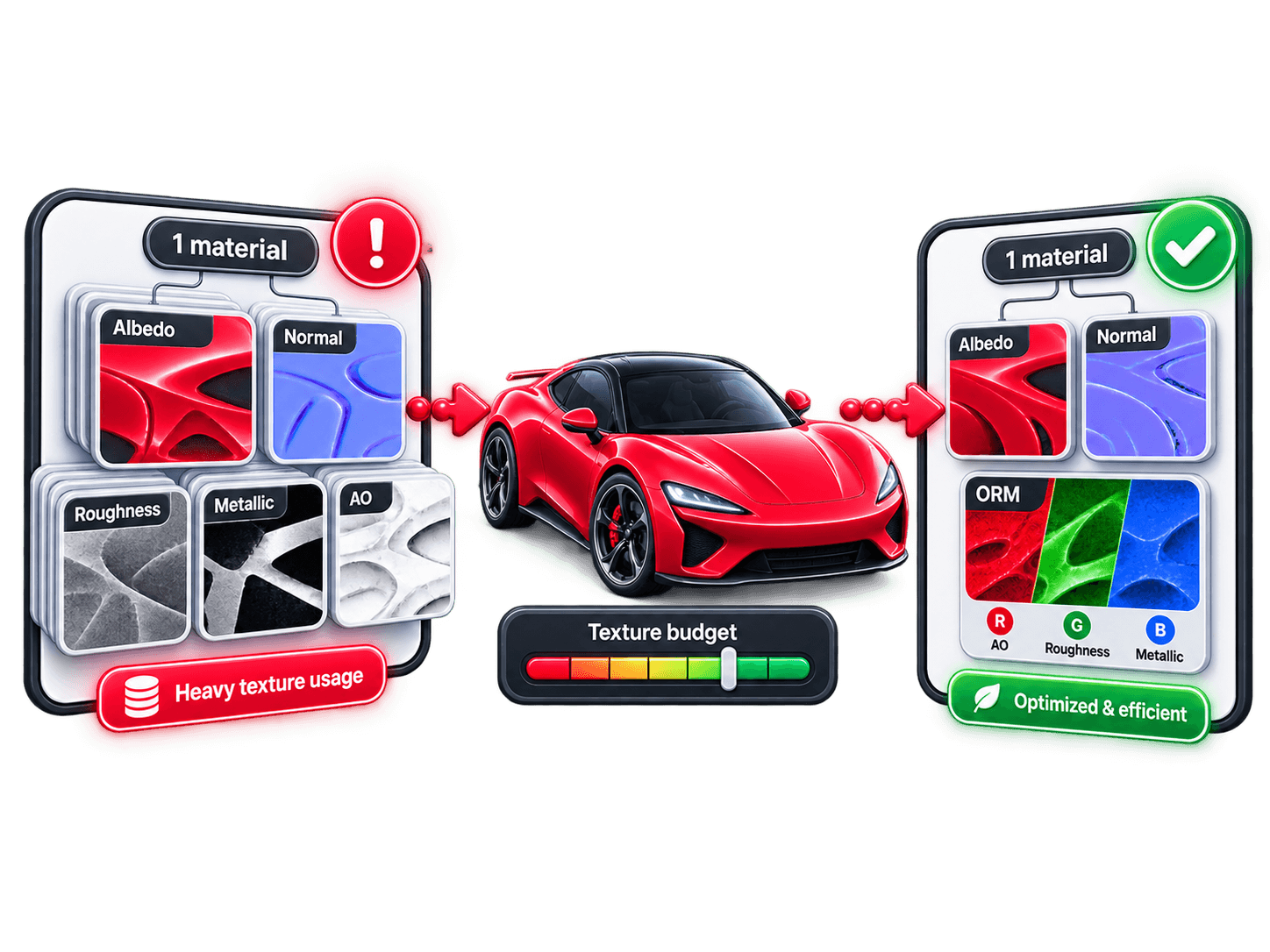
Base color / albedo
May deserve relatively high resolution when it contains printed graphics, labels, stitching, fabric detail or fine material variation. If the visual identity of the product is stored here, aggressive downscaling will be obvious.
Normal map
Normal maps affect surface shading. Fine compression artifacts can therefore produce visible lighting errors even when the image itself never appears directly on screen. They often deserve more careful compression treatment than broad scalar maps.
Resolution can still be reduced when the material does not contain fine normal detail, but blindly applying aggressive compression can damage perceived surface quality.
Roughness
Roughness often contains smoother, lower-frequency information. Depending on the material, it may tolerate a lower resolution than detailed albedo or normal data without a meaningful visual loss.
Metallic
Metalness is frequently simple and sometimes close to binary: metal or non-metal. It often does not need the same resolution as the product's color texture.
Ambient occlusion
AO generally describes broader indirect-shadowing information. It can often tolerate lower resolution than high-detail color or normal maps, so it is a good candidate for resolution reduction when the content allows it.
Masks
Resolution depends completely on what the mask controls. A mask separating two large product regions can be very small. A mask controlling fine logos, stitching or detailed effects may need substantially more resolution.
There is no universal resolution rule. The important principle is to spend texture resolution where the customer can actually see the difference.
Pack compatible material data where possible
Several common material properties are grayscale values. They do not necessarily need separate RGB images.
glTF already packs roughness into the green channel and metallic into the blue channel of the metallic-roughness texture. Ambient occlusion is referenced separately in glTF, but both references can point to the same packed image when the asset pipeline allows it.
That makes the common ORM layout possible:
R = Ambient Occlusion · G = Roughness · B = Metallic
Instead of carrying three independent RGB texture resources, the renderer can obtain those scalar values from channels of the same packed image when the pipeline and material setup support it. This common packing pattern is compatible with glTF 2.0's channel conventions.
Compression strategy should depend on the texture's role
Not every texture responds equally well to the same compression settings.
A base-color texture can often tolerate conventional visual compression reasonably well. Broad scalar maps such as roughness or AO may tolerate stronger optimization depending on their content. Normal maps require more care, because their channel values directly influence the reconstructed surface direction used by lighting.
The correct strategy is therefore not to compress every texture with the same quality setting. It is to choose resolution and compression based on what that map actually does.
This makes texture optimization a visual decision as much as a file-size decision.
Loading 3D should not mean loading final quality immediately
Even after the asset itself has been optimized, the entire visual payload does not need to arrive at final quality before the viewer becomes useful.
Presenter3D uses progressive texture loading. The viewer can begin with extremely low-resolution textures so the first usable scene stays lightweight, then replace them with higher-resolution versions progressively.
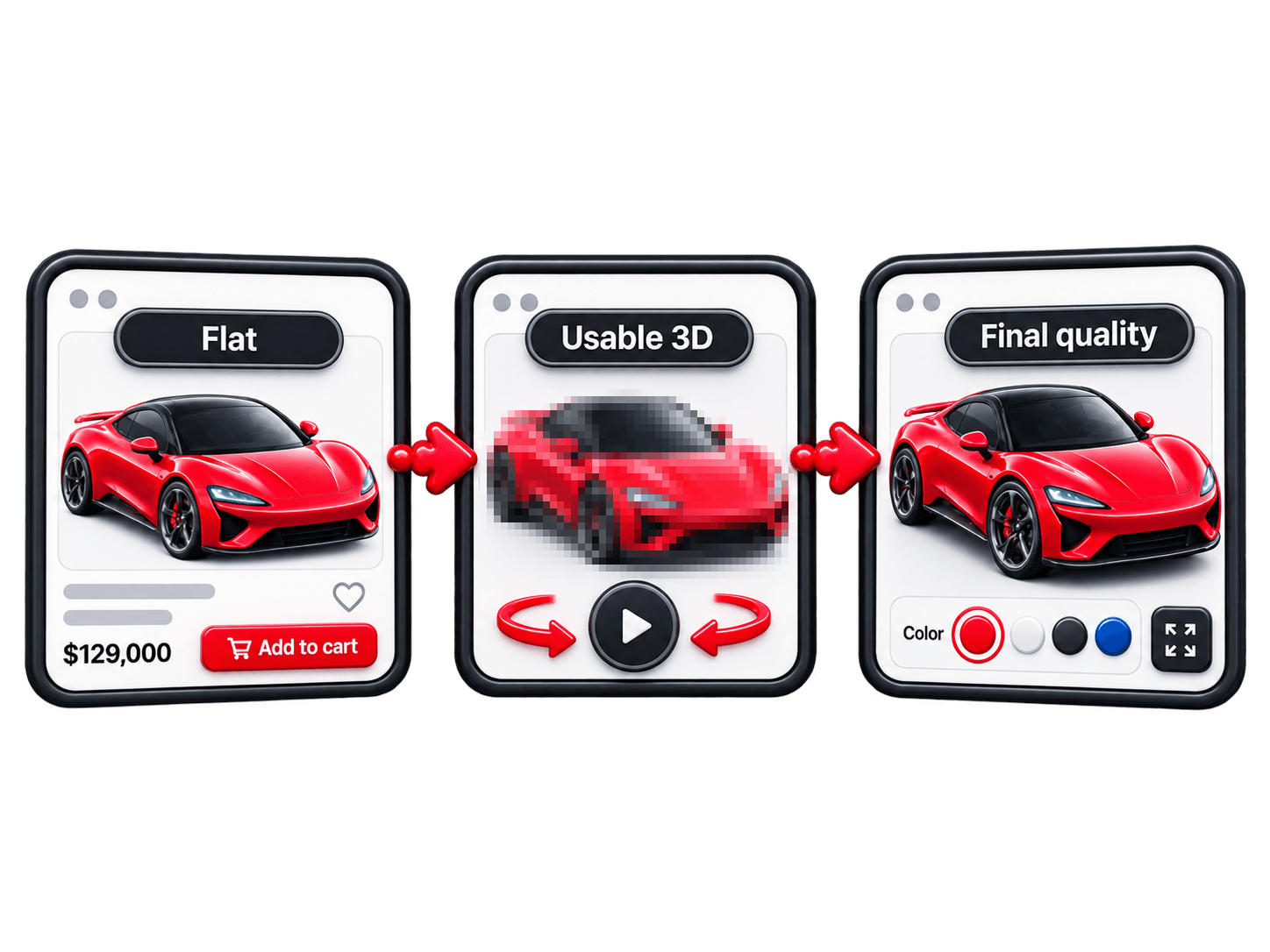
Conceptually: geometry and tiny textures, then the first usable 3D, then medium texture quality, then final texture quality.
This avoids the binary choice between nothing and full-resolution rendering. Final quality does not have to finish loading before interaction begins.
Match quality to the device
Different visitors bring very different hardware. A desktop GPU and a mid-range phone should not automatically receive the same workload.
Relevant differences include screen resolution, GPU capability, available memory, network bandwidth and thermal constraints.
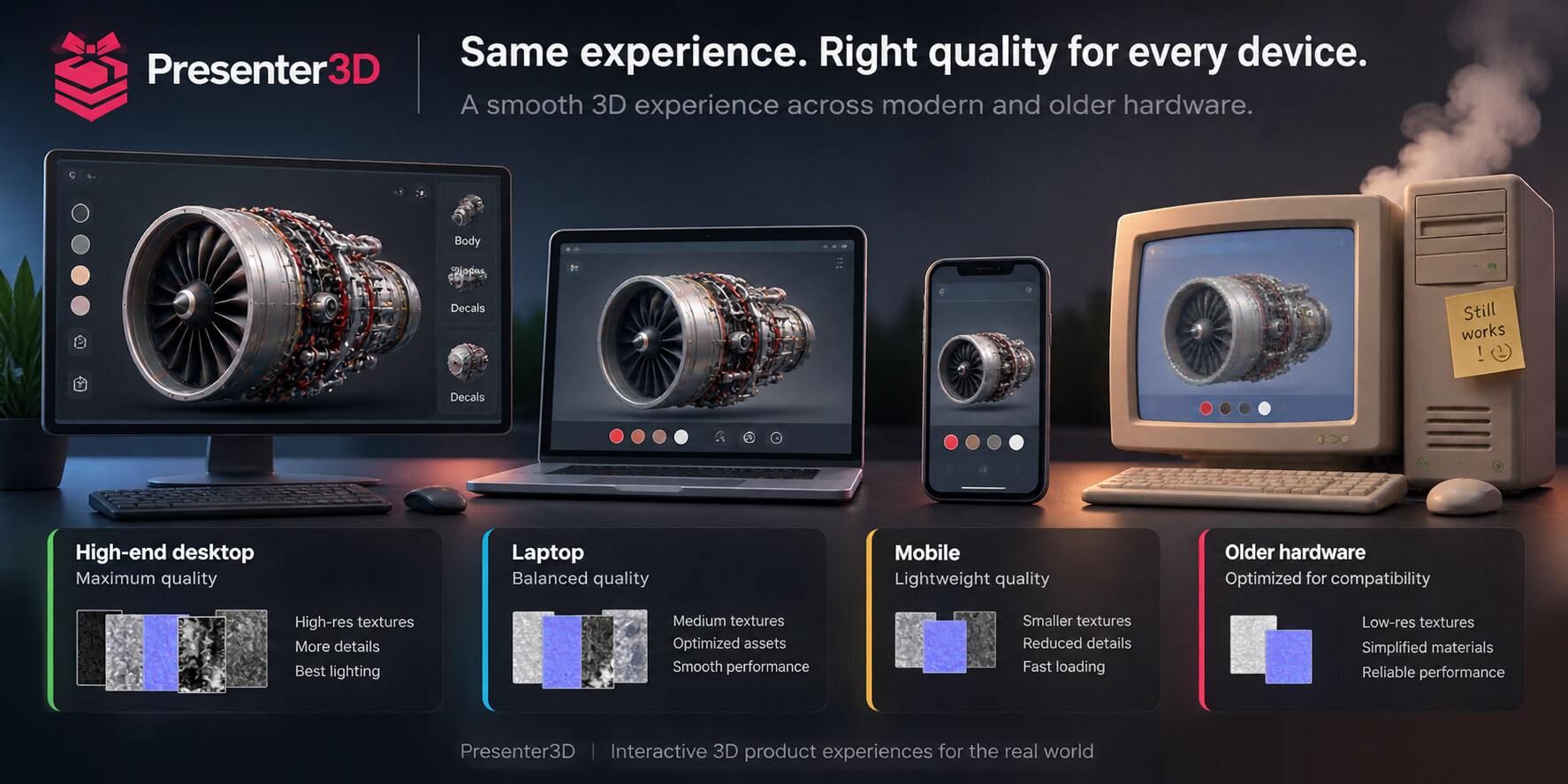
Presenter3D can choose device-aware initial texture resolution and can downscale textures on the client when required.
The goal is performance designed to scale across device tiers, not identical visual resolution on every device.
Manage GPU memory after the scene has loaded
Network optimization gets most of the attention because waiting is visible. But long-running 3D sessions introduce another problem: persistent GPU memory usage.
A configurable product may contain hidden product parts, alternate configurations, environments, multiple material states and optional components. Keeping every texture resident forever wastes GPU memory.
Presenter3D can release textures belonging to objects that become invisible. If those objects become visible again, the necessary textures can be regenerated or restored.
That introduces a deliberate tradeoff: some future loading work in exchange for lower persistent memory pressure. For complex sessions on limited devices, that can matter more than saving another few kilobytes from the initial download.
It is also worth keeping the distinction clear between compressed network size and decoded runtime GPU memory. They are not the same number.
Prefer prebaked lighting when real-time calculation adds little value
Fully dynamic lighting can be expensive. Real-time lights and shadows may add shading work, shadow-map cost, additional GPU passes and runtime complexity.
But product visualization often does not need every lighting contribution to be calculated every frame.
Presenter3D therefore relies heavily on prebaked RGBM lightmaps where practical. The expensive lighting calculation happens before runtime, and the browser receives the visual result rather than recomputing the entire lighting solution continuously. This can preserve high visual quality while significantly reducing runtime cost.
Prebaked also does not have to mean completely static. Presenter3D can use DualRGBM techniques to transition between baked lighting states and create dynamic-looking lighting changes without the equivalent cost of a fully dynamic lighting setup.
The principle is to precompute expensive visual work whenever interaction does not genuinely require calculating it live.
Keep invisible rich media inactive
Product pages may contain flat images, videos, 3D and alternate product views. They do not all need to consume runtime resources simultaneously.
Shopify's product-media UX guidance makes the same recommendation for its own 3D media: 3D should default to inactive on initial page load, and invisible media should remain inactive.
That is a sensible rule regardless of platform. If the customer cannot see or use a rich-media element, avoid spending unnecessary work on it.
Protect layout stability when 3D replaces the flat surface
Hybrid mode may transition from a lightweight image to an interactive WebGL canvas without moving the rest of the product page.
Reserve the media area's size before the viewer initializes. The checkout button should not jump down the screen because the canvas suddenly appears.
This protects CLS and also makes the experience feel more polished.
Loading performance is useless if interaction feels slow
A viewer can load in three seconds and still feel terrible. Click a finish, wait, then the product updates. Or drag an adjustment and the interface stutters.
Technically loaded. Experientially slow.
That is why responsiveness matters as much as download time. The configurator should remain responsive during option changes, camera interaction, continuous controls, external UI synchronization and basket actions.
The fastest model download cannot compensate for sluggish interaction after the scene is ready.
Separate high-frequency interaction from expensive business updates
Some product controls generate many values rapidly: dragging seat height, adjusting a dimension, rotating a mechanical component.
The 3D representation may need smooth live updates. A network request or expensive commerce recalculation usually does not need to happen for every intermediate value.
When appropriate, the architecture can separate continuous visual feedback from heavier finalized business updates. This prevents every tiny slider movement from becoming an expensive commerce operation.
Test on the devices customers actually use
Desktop development machines hide problems. Real customers may use older phones, mid-range Android devices, integrated laptop GPUs, slow mobile connections and memory-constrained browsers.
So test desktop, mobile, slower network throttling, weaker GPUs, long sessions, repeated configuration, visibility changes and background/foreground switching.
The question is not whether the configurator survives a 20-second demo on a development workstation. It is whether it remains useful during a real shopping session.
Measure more than one number
Do not reduce performance to “the viewer loaded in 4.1 seconds.”
Page metrics
- LCP
- INP
- CLS
Shopping metrics
- Time to first visible product
- Time to first usable option
- Time until price and stock are available
- Time until basket and checkout can be used
3D metrics
- Viewer request start
- First usable 3D state
- Final texture-quality completion
- Interaction responsiveness
- GPU memory during longer sessions
Business metrics
- Configuration completion
- Add-to-basket rate
- Checkout start
- Abandonment before 3D readiness
- Errors by device tier
The particularly useful comparison is time to first shoppable surface versus time to full 3D readiness.
If both numbers are identical, the ecommerce page is still structurally waiting for 3D.
Use real-user data after launch
Synthetic tools are useful before launch. PageSpeed Insights and WebPageTest can expose obvious problems.
But production visitors bring real hardware, real networks, real browsers and real behavior. Google explicitly recommends Core Web Vitals as real-world user-experience metrics.
Measure the production experience. A laboratory improvement that makes the actual shopping experience worse is not an improvement.
Do not optimize away the reason you added 3D
There is another failure mode. The team keeps reducing polygons, texture detail, animation, interaction and lighting until the viewer is fast but no longer useful.
Performance optimization should preserve the reason 3D exists. Ask: which expensive features genuinely help the customer understand or buy the product? Keep those. Reduce, bake, delay or remove the rest.
A visible fabric surface may justify texture detail. An invisible internal component probably does not. A meaningful mechanical animation may justify runtime work. A dynamic light almost indistinguishable from a baked solution probably does not.
The performance budget should follow customer value.
Related: How to sell a configurable product online and Best 3D product configurators for ecommerce.
A practical Presenter3D performance architecture
A performant ecommerce experience can look like this.
First paint — Machine-readable
HTML · static product surface · product information · poster · alt text · optional Product / 3DModel structured data
First shoppable state
product options · price · stock · basket · checkout
Background
Presenter3D runtime begins · optimized geometry loads · very-low-resolution textures load
First usable 3D
current product configuration appears · interaction becomes available
Progressive quality
texture quality increases · device-appropriate assets are used
Ongoing session
invisible texture resources can be released · prebaked lighting limits runtime cost · only useful rich-media elements remain active
The page remains useful throughout the process. That is the target architecture.
Performance checklist before launch
First surface
- Is the product visible quickly?
- Is the important image prioritized appropriately?
- Can the buyer shop before 3D is ready?
- Are pricing, stock, basket and checkout independent from viewer initialization?
Geometry
- Are invisible or internal surfaces removed where appropriate?
- Is polygon density concentrated where it creates visible value?
- Are repeated meshes reused where practical?
- Are unnecessary mesh and material splits reduced?
Textures
- Does each material map actually need its current resolution?
- Are detailed normal maps preserved appropriately?
- Can roughness, metallic or AO maps use lower resolution?
- Can compatible grayscale maps be channel-packed?
- Is compression appropriate for the map type?
Viewer loading
- Does 3D begin at the correct point in the page lifecycle?
- Does it compete with more important requests?
- Is the initial 3D payload deliberately lightweight?
- Does state transfer correctly from the flat UI?
Runtime
- Is texture quality appropriate for the device?
- Can invisible texture resources be released?
- Are unnecessary dynamic lights avoided?
- Does the experience remain responsive during long sessions?
Stability
- Is media space reserved before viewer initialization?
- Does the transition from flat media to 3D avoid layout shifts?
- Are invisible rich-media elements inactive?
Devices
- Representative mobile hardware
- Desktop
- Slower network
- Weaker GPU
- Longer sessions
Measurements
- LCP, INP and CLS
- First shoppable surface
- First usable 3D
- Final-quality completion
- Error and failure rate by device
Final takeaway
A fast 3D product configurator is not simply a small GLB. It requires efficient geometry, disciplined texture budgets, appropriate compression, progressive visual quality, controlled GPU memory, efficient lighting and device-aware rendering.
But even excellent 3D optimization does not change the fundamental fact: a rich interactive scene will require more work than displaying a static product image.
So do not make ecommerce wait for it. Make the product visible. Make configuration usable. Expose price and stock. Enable the basket and checkout.
Then let the optimized 3D experience arrive progressively around a shopping journey that already works.
That is the core principle behind Presenter3D Hybrid mode: the shop should be fast first, and the 3D experience should make it richer afterward.
See the shopping surface work before 3D is ready
Open the Presenter3D live shop and start configuring the product while the richer 3D experience loads in the background.